1098 Mailer Options |
  

|
Navigation: Year-end Processing > Loan Year-end Processing > Year-end Booklet > 1098 Mortgage Interest Options >
1098 Mailer Options |
|
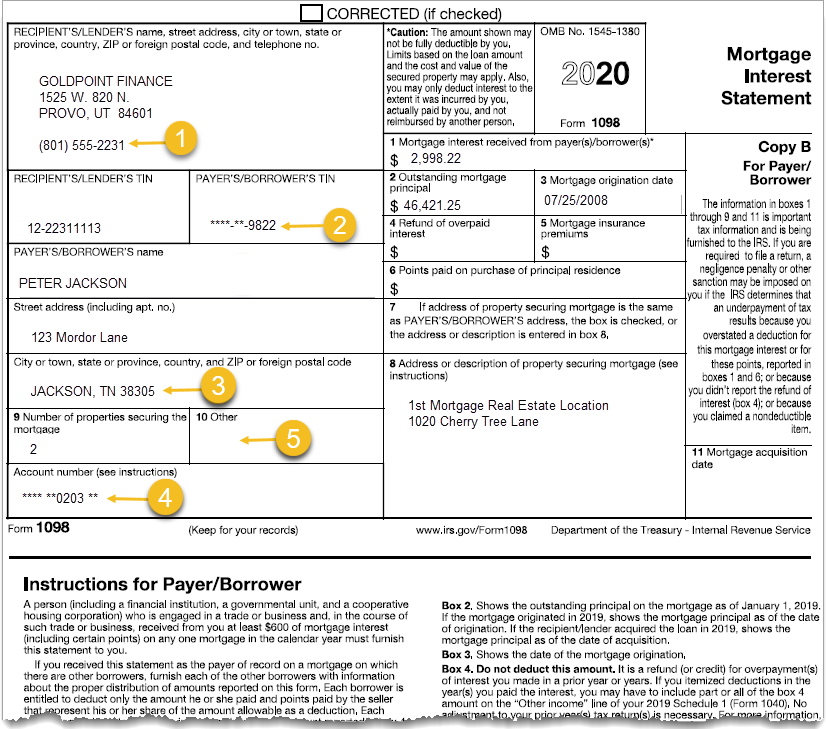
The condensed 1098 mailer resembles the IRS 1098 form. It is printed on one side of one piece of paper, with the form on top and instructions on bottom.
GPS strongly suggests using this type of statement.
•It doesn’t include yearly history on the account, which helps eliminate unnecessary calls from account holders.
•Payment and account history can then be viewed online using their monthly statements.
•Shows only the important IRS filing information.
•Easier to read for the customer.
If you choose this type of year-end document you want for your customers on the Client Year-end Reporting Setup Form, you must also designate which additional items you want on the form (see below). (After you designate which options you want, your GPS account manager will set up the respective option on the FPSRP382 report setup before year-end processing runs.)
1098 Mailer Options
If you want the 1098 Mailer, choose any of the following additional options. (These options are set up by your GPS account manager in the FPSRP382 report setup.)
The following is an example of the 1098 Mailer highlighting the available options, followed by descriptions of those options.
•If the mailing label address is the same as the property mailing address, Box 7 will be marked with an "X" (meaning yes).
•If the mailing label address is not the same as the property mailing address, then Box 7 will be blank (meaning no), and Box 8 will then display the property address information, if available (as shown in the example above).
•In Box 9, if two or more properties are securing the mortgage, the number will be displayed here (e.g., 2, 3, 4, etc.).
Option |
Description |
||
|---|---|---|---|
 |
Place branch phone number instead of home office? (Report Option)
Select this option if you want the branch phone number on IRS forms instead of your institution's home office number. The branch phone number can be entered on the GOLD Services > Office Information screen in CIM GOLD.
Note: GOLDPoint Systems account managers must also set up Misc Opts 3 on the Annual Loan Statement (FPSRP382) report setup. |
||
 |
Mask all but the last 4 digits of the borrower’s tax ID number (SSN or EIN)? (Report Option)
Select this option if you want to mask all but the last 4 digits of the borrower’s tax ID number, as shown in the example above. Your GOLDPoint Systems account manager must set up that option for you in the Annual Loan Statement (FPSRP382) report setup. |
||
 |
Do you want to sort mailers by mailing address zip code? (Report Option)
Check Yes if you want condensed mailers to be sorted in zip-code order of the account owner’s address.
Do not check Yes for option 3 above if using this option.
Your GOLDPoint Systems account manager will set up this option for you on the Annual Loan Statement (FPSRP382) report setup. |
||
 |
Mask all but the last 4 digits of the account number? (Report Option)
Check Yes if you want to mask all but the last 4 digits of the borrower’s account number on the condensed mailer, as shown in the example above. Your GOLDPoint Systems account manager must set up that option for you in the Annual Loan Statement (FPSRP382) report setup. |
||
 |
Display the LIP Disbursed Balance, not the Principal Balance, on mailer? (Report Option)
Box 10 (Other) of this mailer is for miscellaneous information. GOLDPoint Systems usually prints the principal balance, year-to-date taxes, or insurance paid in this box. However, if this option is selected, the LIP balance will be printed in Box 10. We will not make programming changes to add other information to this box. |