|
Statement Cycle |
  

|
Navigation: Deposit Screens > Account Information Screen Group > Account Information Screen > Account Information tab > Account Information field group >
Statement Cycle
|
Statement Cycle |
|
Use the Statement Cycle field to indicate how often the system should produce statements for the customer account.
If the value in this field is changed and either the original or new value is less than 100, the Average Percentage Yield (APY) will not be printed on the customer account’s statement for the current cycle. However, the next cycle’s statements will show the APY.
The following codes are possible selections in this field:
000 - Never Produce a Statement
001 - Monthly Statement
002 - Bi-Monthly Statement (Every Other Month)
003 - Quarterly Statement
006 - Semi-Annual Statement
012 - Annual Statement
016 - Semi-Annual Months 3 and 9
214 - Statement Every Wednesday
216 - Statement Every Friday
255 - Daily Statement
Additionally, statement production can be specified to a numbered day of the month, using the codes shown below:
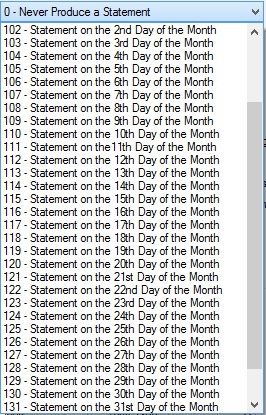
If "0 - Never Produce a Statement" is selected in this field and the customer account has ATM or ACH activity, you can request Reg E notices to be run for your institution.
For statement cycle codes that don't specify a day of the month, the statement is produced on the last day of the appropriate month.
If the Anniversary Interest field on the Deposits > Account Information > Interest Fields screen is marked, only statement cycle codes 0, 6, and 12 are available.
To use the imaged statement option (Imaged Account? is marked), contact GOLDPoint Systems to designate a third-party check image processor and enable the necessary system features. For a current list of vendors available for this service, see Ancillary Services in the Other section in DocsOnWeb. If GOLDPoint Systems processes your imaged statements (Institution Option OPTU - FIMG), only statement cycle codes 102-131 can be used with imaged accounts. To learn more about imaged statements, see help for the Deposits > Account Information > Check Imaging screen as well as the Check Imaging Options help page. Imaged statement features can be adjusted for individual customer accounts in the Image Fields field group on the Deposits > Account Information > Statement Fields screen.