IRS Loan Forms |
  

|
Navigation: Forms Screen >
IRS Loan Forms |
|
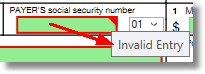
Note: Before you print any IRS forms from IRS GOLD, you must audit each one and make sure there are no errors. Any box highlighted in red indicates that either data must be entered or that the information entered is incorrect. If you hover your cursor over the red box, a pop-up message will appear indicating why the error is there, as shown below:
For a list of all possible mnemonics in the IRS GOLD system, see the IRS Information Returns (IR) section in the Mnemonic Dictionary.
 |
Tip: Please review the Loan Year-end manual for important dates IRS forms are submitted by GOLDPoint Systems, as well as options your institution may want to use when submitting forms to the IRS. |
|---|
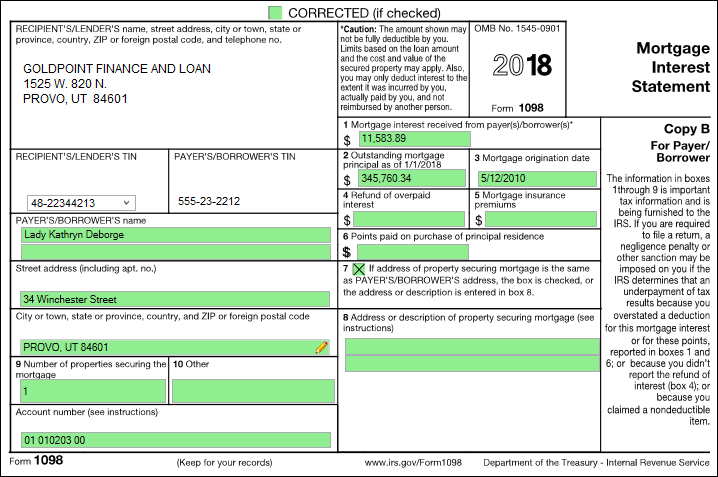
This form is used to report mortgage interest, points, and/or mortgage insurance premiums paid to you by the borrower. The loan year-end process automatically creates 1098 forms for all applicable mortgage loan accounts. However, that information is not automatically added to IRS GOLD. IRS GOLD is used to submit corrections for any errors that are found on the statements sent to account owners.
For more information on the automatic statement sent to your customers, see the Annual Loan Statement (FPSRP382) documentation.
See the following example of the 1098 form in IRS GOLD:
 Click to expand. |
The following forms are required with loan assumptions:
If the Create 1098 Record field (located on the Loan Assumption screen, Seller Information tab) is selected at the time the assumption is processed, the following information is automatically sent to IRS GOLD:
•the seller's name, address, and tax ID; •the seller's portion of the interest paid for the year (including the pro-rated interest).
This information is sent at the time of the assumption, not at year-end. See the example above of this form.
If the Create 1099-INT and/or the Report Late Charges as Interest to IRS field (located on the Loan Assumption screen, Seller Information tab) is selected at the time the assumption is processed, the following information is automatically sent to IRS GOLD:
•the seller's name, address, and tax ID; •the amount of interest paid on reserves and/or late charges paid.
This information is sent at the time of the assumption, not at year-end. See the example of this form in the Deposit Forms section. |
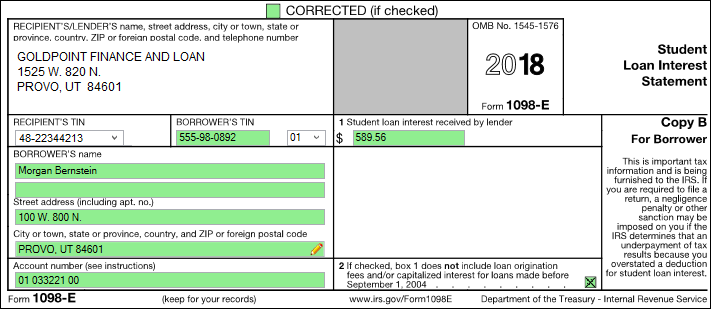
Interest paid on student loans is deductible under certain circumstances. Lenders who received interest of more than $600 are required to file a 1098-E. Refer to the IRS regulations for further details.
Note: The Loan system does not generate the 1098-E forms; you must create a 1098-E for your student loans. Create the form in IRS GOLD.
See the following example of this form:
 Click to expand. |
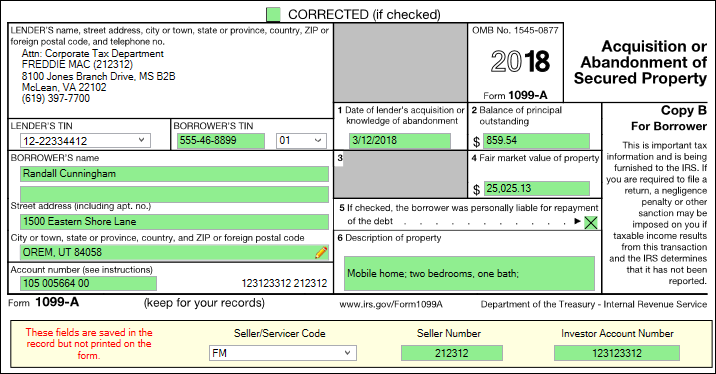
The 1099-A form must be created in IRS GOLD. This form is not automatically created through the Loan Year-end program (see the Loan Year-end documentation).
Freddie Mac and Fannie Mae require that the lender report the 1099-A for them (see Freddie Mac or Fannie Mae servicer’s guides). At the bottom of the 1099-A form screen, there is a Seller/Servicer Code field where you indicate whether you are reporting for one of those investors. Select Freddie Mac or Fannie Mae, and the form will automatically use the correct name and Tax ID number for those investors (the institution’s phone number is used). In addition, when Freddie Mac or Fannie Mae is selected, the Seller Number and Investor Account Number fields are opened to file maintenance.
You must enter the information in these fields as follows:
•Freddie Mac Seller Number is 6 digits. •Investor Account Number is 9 digits. •Fannie Mae Seller Number is 9 digits. •Investor Account Number is 10 digits.
When these numbers are entered, the system will place them in the Account Number box next to the borrower’s loan number. For Freddie Mac, the Seller Number is also added next to Freddie Mac’s name in the Lender’s Name box.
Note: The Seller/Servicer Code, Seller Number, and Investor Account Number fields are not on the actual IRS 1099-A form. We have added them to the screen to cause the form to use the correct name, Tax ID number, and investor information, as shown in the screen example below.
A report of 1099-A forms you have filed for Freddie Mac or Fannie Mae can be created from the Reports for Investors screen under IRS GOLD in the tree view.
See the following example of this form:
 Click to expand. |
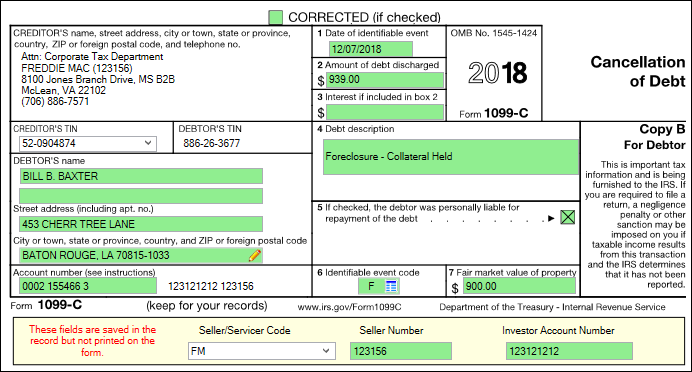
If you canceled or forgave a debt of $600 or more, you may need to file a 1099-C. The 1099-C form must be created in IRS GOLD. This form is not automatically created through the Loan Year-end program (see the Loan Year-end documentation). Refer to the IRS regulations for further details. However, if your institution has option T99C turned on, the system will automatically create a 1099-C form for the account when the account is written off (tran code 2510-05) with an amount of more than $600. See the Full Write-off transaction in the Transactions manual for more information.
The 1099-C information can also be set up on the Loans > IRS Form 1099-C screen in CIM GOLD. Please refer to that screen for more information.
Freddie Mac and Fannie Mae require that the lender report the 1099-C for them (see Freddie Mac or Fannie Mae servicer’s guides). At the bottom of the 1099-C form, there is a Seller/Servicer Code field you mark if you are reporting for one of those investors. Select Freddie Mac or Fannie Mae, and the form will automatically use the correct name and Tax ID number for those investors (the institution’s phone number is used). In addition, when Freddie Mac or Fannie Mae is selected, the Seller Number and Investor Account Number fields are opened to file maintenance.
You must enter the information in these fields as follows:
•Freddie Mac Seller Number is 6 digits. •Investor Account Number is 9 digits. •Fannie Mae Seller Number is 9 digits. •Investor Account Number is 10 digits.
When these numbers are entered, the system will place them in the Account Number box next to the borrower’s loan number. For Freddie Mac, the Seller Number is also added next to Freddie Mac’s name in the Lender’s Name box.
Note: The Seller/Servicer Code, Seller Number, and Investor Account Number fields are not on the actual IRS 1099-C form. We have added them to the screen to cause the form to use the correct name, Tax ID number, and investor information, as shown in the screen example below.
A report of 1099-C forms you have filed for Freddie Mac or Fannie Mae can be created from the Reports for Investors screen under IRS GOLD in the tree view.
See the following example of this form:
 Click to expand. |
The following paragraphs describe the 1099-MISC forms required for specific accounts.
1099-MISC for Brokers
Fees paid to brokers during the current tax year must be reported to the IRS. The broker must be set up on the Loans > Payee Information screen in CIM GOLD, and the Report to IRS field must be checkmarked. For each loan, enter the broker number and the amount paid on the Loans > Account Detail screen, Origination tab. At the end of the year, the system adds all the amounts of each loan (only those opened this tax year) with the same broker number and sends the total along with the payee name and address information to IRS GOLD.
1099-MISC for Construction (LIP) Contractors
The IRS requires that payments to contractors and subcontractors be reported. If you are using the GOLDPoint Systems Construction Budget system, GOLDPoint Systems can assist you with this reporting. Disbursements must have been made on the Loans > Construction > Disbursement Processing screen. The checks must be printed from Loans > Check Printing > Checks screen or by using the transfer-to-deposit account feature on the Payee Information screen. The system pulls the information from the payee record. The Report to IRS field on the Payee Information screen must be checked. This information feeds to IRS GOLD.
Note: If you are reporting the Payee Name to the IRS, you should confirm that the tax ID number entered on the Payee Information screen matches the Payee Name. If you do not want to report the Payee Name but want to report the Company Contact, check the Report Company Contact to IRS field on that screen. Also, be sure you have printed all the LIP check registers by December 31st. The check register function updates the amount paid to the contractor on the Payee Information screen.
WARNING: If you have construction loans and are interested in reporting to the IRS, contact your GOLDPoint Systems banking consultant for more information. Do not assume this will automatically happen; you may need to enter dollar amounts and other information.
1099-MISC for Rentals
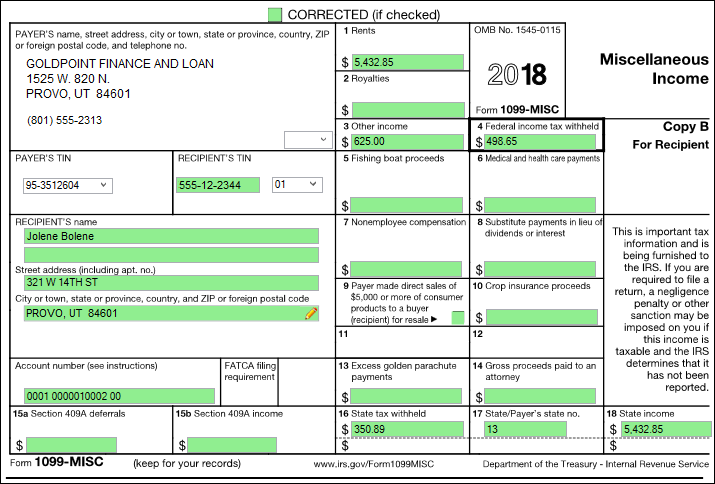
The year-end processing identifies all rental accounts (payment method 8) with a year-to-date disbursement balance in the contract collection seller record. It also creates a file that is passed to IRS GOLD to create the 1099-MISC records.
See the following example of this form in IRS GOLD:
 Click to expand. |
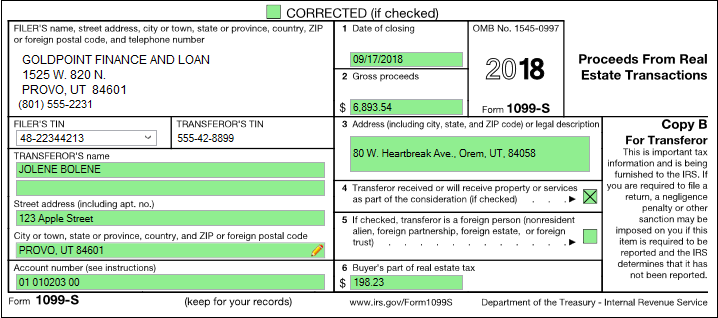
This form is used to report the sale or exchange of certain real estate for money, indebtedness, property, or services. The institution responsible for closing these transactions must report this information to the IRS. Refer to the IRS regulations for further details.
1098-S forms are automatically added to IRS GOLD from GOLDTrak PC when applicable. If you are not using GOLDTrak PC, you can create the forms manually in IRS GOLD.
Note: If you are filing 1099-S forms, be aware that you must also report the buyer’s portion of property taxes paid.
See the following example of this form:
 Click to expand. |


