Correcting Forms through IRS GOLD |
  

|
Navigation: IRS GOLD Overview >
Correcting Forms through IRS GOLD |
|
You should submit a correction to the IRS to correct an IRS form previously submitted to, and processed by, the IRS which contained incorrect information.
If a correction to data that has been transmitted to the IRS is necessary, the information must be entered using a new IRS form selected in IRS GOLD.
Two types of corrections are available:
See also Form 1042-S Corrections at the end of this topic for information about sending corrected 1042-S forms.
If you need to make a correction, depending on the type of correction being made, you can modify the form previously sent to the IRS if it is in the IRS GOLD system, or you can create a new form. On the form, check the Corrections checkbox. Once this box is checked, the Type fields become file maintainable. You must also mark the type of correction: "C" or "G."
 |
WARNING: If you modify the original IRS form, delete the date in the Date Posted field. This field indicates that the information was already sent to the IRS. When GOLDPoint Systems pulls IRS forms to transmit to the IRS, it skips all forms with a date posted. We recommend that rather than modifying the form, you create a new form. Refer to the "Modifying A Form" section in this user’s guide for further information.
If the Date Posted field is blank, GOLDPoint Systems has not sent this information to the IRS. |
|---|
See the following example of an IRS form with the Corrected box checked and showing the two possible correction options:
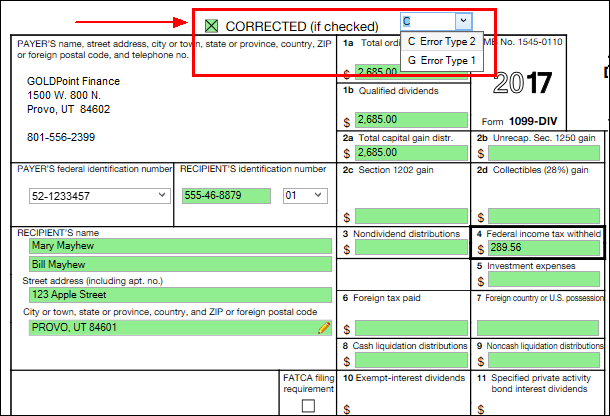
A type "C" correction requires two return entries and should be used if the original return was filed with one or more of the following errors:
1. No payee TIN (tax ID number) was entered.
2. An incorrect payee TIN was entered.
3. An incorrect payee name was entered.
4. The wrong type of return indicator was used.
Two return entries (two IRS forms) are required, and all information must be on both forms.
•The first form indicates that the previously submitted form was incorrect. This notifies the IRS to mark their records accordingly. The information on this form must be exactly the same as it was on the original submission, with the following exceptions: the Correction checkbox and Type G fields must be marked and all payment amount fields must be blank.
•The second form is used to report the correct information. This second form is marked as a Correction. Mark the Type field as "C," and enter the correct dollar amount.
 |
Note: Transmissions for other than the current year require that you send a work order to GOLDPoint Systems. |
|---|
A type "G" correction is a single-entry correction and requires only one return entry (one IRS form). This should be used for any correction needed other than those listed above for type "C."
Type "G" corrections should be submitted if the original return was filed with one or more of the following errors:
1.Incorrect payment amount codes were entered in the Payer "A" Record.
2.An incorrect payment amount was entered in the Payee "B" Record.
3.An incorrect code was entered in the Distribution Code field in the Payee "B" Record (Forms 1099-R and 1099-SA).
4.An incorrect payee address was entered.
5.An incorrect direct sales indicator was entered (Form 1099-MISC).
For Form 1042-S corrections, valid entries are "V" for a void record and "C" for a correction record.
•A void record is an information return (Form 1042-S) that is submitted in order to delete a previously filed incorrect original return. A void record must be a duplicate of the original successfully processed return with the exception of a "V" in the Type field. The Posted field must also be blank. A void record can be filed with or without a corresponding "C" record.
For example, a Form 1042-S was submitted, and it should have been prepared as a Form 1099-INT. In this case, a new Form 1042-S with the original 1042-S information would be filed with a "V" in the Type field. A corresponding "C" record would not be necessary.

