Security for IRS GOLD |
  

|
Navigation: IRS GOLD Overview >
Security for IRS GOLD |
|
With most screens and functions in CIM GOLD, there are two types of security: screen level and field level.
Screen-level security is set up using the Security > Setup screen > CIM GOLD tab. Your security officer must give each user security approval in order to use IRS GOLD. With the appropriate CIM GOLD screen security, your employees can view and change IRS forms entered into the system at any time.
The following screen example shows which IRS GOLD security options are available:
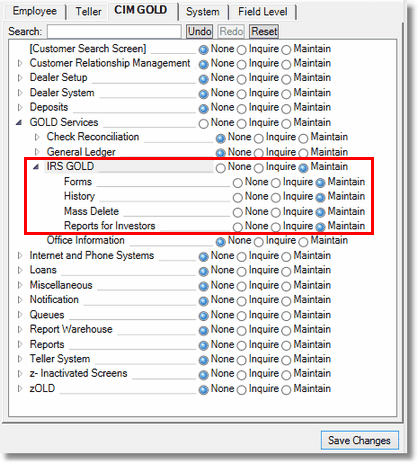
•Set the IRS GOLD security options to None if you do not want this user or profile accessing the IRS GOLD screens.
•Set the IRS GOLD security options to Inquire if the user or profile should be allowed to view information on the IRS GOLD screens, but not make and save any changes to the information.
•Set the IRS GOLD security options to Maintain if the user should be allowed to view and make changes to information on the IRS GOLD screens.
Field-level security it also available for each of the fields on the IRS GOLD Forms screen. To set field-level security for users or profiles:
1.Access the Security > Setup screen.
2.Make sure the Display Effective Security box is unchecked.
3.Access the Field-level tab.
4.Select the Name or Profile in the provided fields for who you want to restrict specific IRS GOLD fields.
5.In the Record Type field, select "FPIR - IRS Information Returns."
6.Check each of the boxes for the fields you want to restrict the user/profile from making changes.
7.Click <Save Changes>. Those fields will be grayed out for the user/profile. For detailed information about each field in the IRS Information Returns record, see the Field Dictionary for the IRS Information Records in the Mnemonic Dictionary.
Note: You can also restrict users from being able to delete IRS returns by selecting Record Type "FPFS - Miscellaneous Security" and checking the box for FSDLIR - Delete IRS Return.
See the following example of these steps:
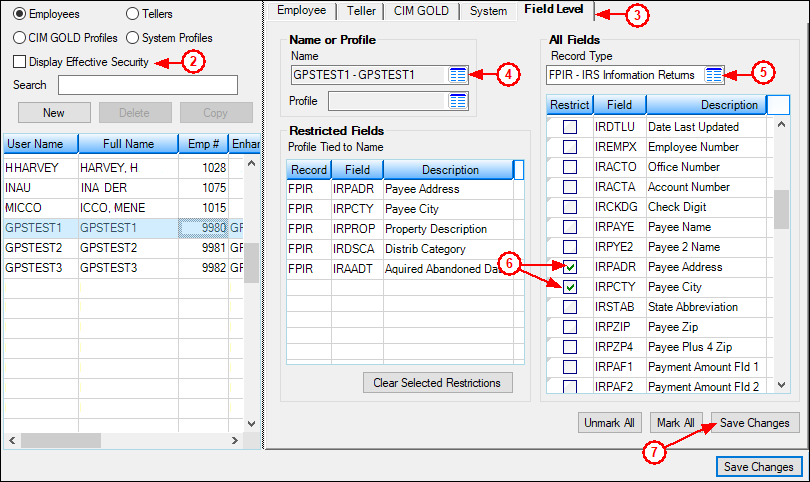
Click to enlarge.

