New Address Verification Methods Linking to the USPS |
  

|
Navigation: GOLDTrak PC What's New > GOLDTrak Version 7.8.28 - 7.8.39 >
New Address Verification Methods Linking to the USPS |
|
CMP: 781
New functionality is now available for better address verification with the U.S. Postal Service database. This is a great way for users to include the extra four digits of a Zip code, which can help save costs when doing mass mailings, as the U.S. Postal Service gives a discount if the extra four digits of a Zip code are included.
Your GOLDPoint Systems account manager will need to help you with the set up and connecting to the U.S. Postal Service’s database, but once it is set up, this is how it will work:
A new <USPS> button can be added to the Consumer Application screen, 1003 III & V screen, in the borrower’s and co-borrower’s address sections. Clicking this button launches the USPS Address Verification dialog. See examples below:
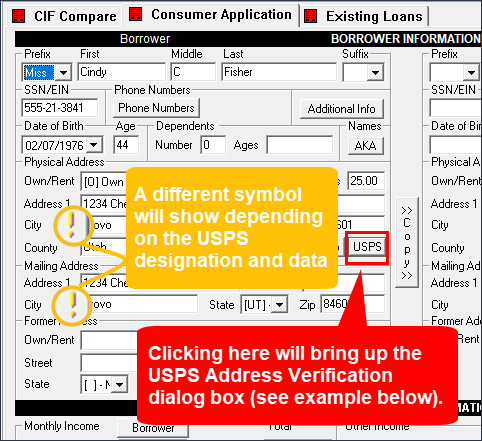
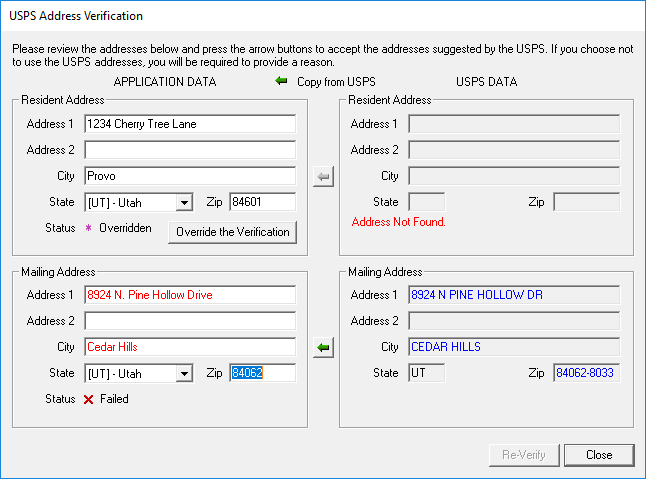
If the U.S. Postal Service has a slightly different address than the one entered, it will suggest a change on that screen, as shown above. The user can choose to use the suggested changes or override them.
The exclamation point next the address will change as follows:
 |
This indicates the address has not been verified against the address listed in the U.S. Postal Service database. |
 |
This indicates the address was overridden by the user. |
 |
This indicates the address does not match the address on file from the U.S. Postal Service. The user should click the green arrow |
 |
This indicates the user verified it with the U.S. Postal Service and the address is up to date. |
No symbol shows if the address entry is blank. |
Contact your GOLDPoint Systems account manager if you want to implement this feature.
 to update the entered address with the one from the USPS. Usually, this error occurs when the zip code is missing the four extra digits (e.g., 84062-8033).