1099 Interest Statement Options |
  

|
Navigation: Year-end Processing > Deposit Year-end > 1099-INT Processing >
1099 Interest Statement Options |
|
The 1099-INT forms are run in November each year first as a test. In the afterhours of December 31st of every year, a final run of the forms is created and available in GOLDView Plus. You can print the forms from GOLDView Plus and send them to your account holders, or you can choose to have GOLDPoint Systems mail them to your account holders (as designated in the Shipping section).
 |
IMPORTANT
If an account owner or business has multiple deposit accounts, those accounts will only be combined into one 1099-INT if the IRS owner's customer ID type (MNCTYP or NDCTYP) is a Social Security number or an EIN. Any IRS owner customer ID type for a tax ID number will be printed on its own form and not combined with any other account.
In CIM GOLD, the Tax ID/Customer ID (NDCSSN) and ID Type (NDCTYP) fields are found on the Customer Relationship Management > Households screen > Names tab. |
|---|
Loans: If your state requires paying interest on reserves, the afterhours will produce a 1099-INT for those loan borrowers who earn interest on reserves (accounts must be set up in the Loan system in CIM GOLD accordingly). There is an institution option to turn off reporting 1099-INT on reserve accounts. See Does your state require interest paid on reserves to be reported to the IRS (1099-INT)? in the General Loan Questions in the Loan Year-end Booklet. The IRS does not require institutions to report 1099-INT on reserve accounts.
Field Descriptions on the Deposit Year-end Form
The following descriptions explain how to fill out the Client Year-end Reporting Setup Form for Deposits.
Field |
Description |
||
|---|---|---|---|
Number of Test Statements to Print |
Before year-end, usually in November, GOLDPoint Systems does a test run to show in GOLDView Plus. This test run generates as many test statements as you need to make sure what is on the year-end forms is accurate.
Use this field on the form to enter the number of statements (forms) you want processed during the test run of the year-end processing. The system uses the Sort Forms By field (below) to determine the order of the statements. For example, if the Sort Forms By field is set to “SSN,” and this field is set to 50, then the first 50 Social Security numbers of account owners would be processed in numerical order for the test run.
The tests will show in GOLDView Plus the day after the test run for auditing purposes. If any part of the test statements appears to be incorrect, or you have selected the wrong setup options, contact your GOLDPoint Systems account manager. Failure to contact GOLDPoint Systems will result in your final run at year-end being incorrect, and you will be charged for any reruns.
|
||
Test Run Date |
Enter the date you want GOLDPoint Systems to process a test run of your 1099-INT statements. The statements created from this test will be put into your GOLDView Plus for audit. Only the number of statements indicated in the Test Statements to Print field (see above) will be processed during the test run.
If any part of the test statements appears to be incorrect, or you have selected the wrong setup options, contact your GOLDPoint Systems account manager. Failure to contact GOLDPoint Systems will result in your final run at year-end being incorrect, and you will be charged for any reruns.
This year, GOLDPoint Systems will be running test runs on any of the following dates: November 2, 3, or 4.
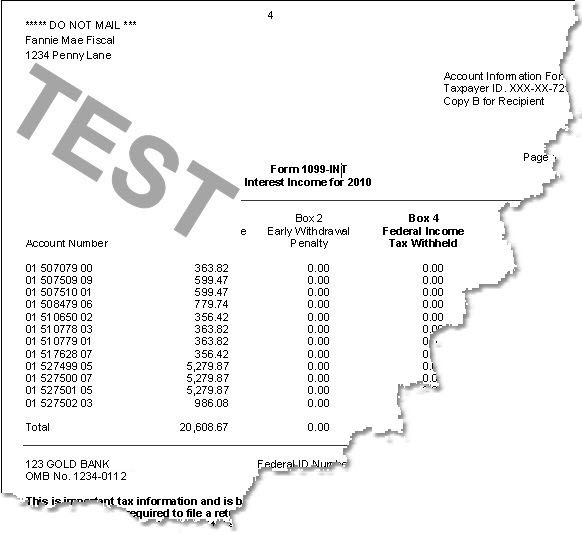
Choose which date your institution wants test statements to run and be available in GOLDView Plus to inspect. Test statements will have the word "TEST" across the front of each statement, as shown below:
 |
||
Interest Limit |
Enter the minimum amount of interest earned by accounts for which you want to print a 1099-INT statement for. IRS regulations require that all deposit accounts earning $10.00 of interest or more must have a 1099-INT statement sent to the account owner at year-end processing. However, your institution may choose to send 1099-INT statements for all deposit accounts earning any amount of interest. In this case, you would enter "0" in this field or leave it blank. |
||
Additional Options |
|||
Create New Form If Address Changed |
Select this option if you want to print separate 1099-INT statements if IRS owners' addresses are not exactly the same. If this box is checked, all accounts with the same Social Security number are combined and for every different address, a separate 1099 is created for those owners. |
||
Print “C” by Closed Accounts |
Select this option if you want a "C" to print to the right of the account number on the 1099-INT statement. The "C" indicates that the account is closed. |
||
Print IRS Owner’s Name Only |
Select this option if you only want the name of the IRS owner to print on the 1099-INT statement. When combining by Social Security number, we may include husbands, wives, and children's accounts, where different co-owners are listed. If this box is checked, only the IRS owner's name and Social Security number will be shown. If this box is not checked, then the lowest account number in the accounts combined will print both owner and co-owner names. |
||
Print CD Balance and Maturity Date? |
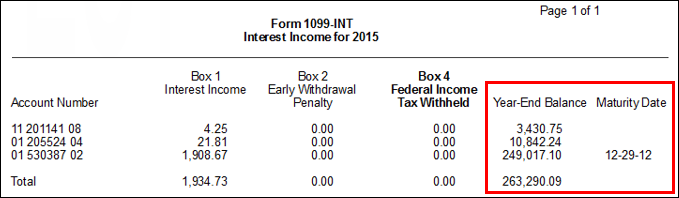
Select this option if you want to include the Year-End Balance and Maturity Date fields on 1099-INT statements to account holders. The Year-End Balance field displays the balance of the account at year-end. The Maturity Date is the date of maturity for any CDs, if applicable. Year-end balance and maturity date are not furnished to the IRS.
 |
||


