New Fields on NADA Screen |
  

|
Navigation: GOLDTrak PC What's New > GOLDTrak Version 7.9.17 - 7.9.25 >
New Fields on NADA Screen |
|
CMP: 14671
New fields are available on the NADA Vehicle Value screen. These fields are Region and As of, as shown below. This allows loan officers to designate when the NADA value was recorded. NADA values vary from month to month and region to region, so this allows a time and place designation on the values. The NADA database will return the accompanying values from that region and time after <Value> is clicked.
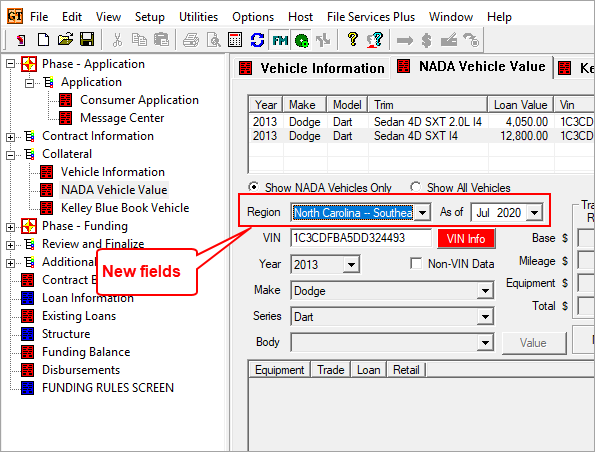
NADA Vehicle Value Screen
When an application is first created, today's month and year are defaulted into the As of field. NADA only updates their values at the beginning of the month, so a day portion of the date isn't needed.
The Region field includes the state, as well as the region.
For the As of date to appear on the screen, the SHOW_NADA_ASOF_DT_VI must be set to "Y" (true) in the loan program. Your GOLDPoint Systems account manager can help you set up your loan programs if you want these fields to show on the NADA Vehicle Value screen.
GOLDPoint Systems Only: These new fields are found in the VEHICLE_INFO group:
SHOW_NADA_ASOF_DT_VI (Show NADA As Of Date)
NADA_ASOF_DT_VI (NADA As Of Date)
NADA_REGION_NAME_VI (NADA Region)