GOLDTrak Version 7.9.0 - 7.9.4 |
  

|
Navigation: GOLDTrak PC What's New >
GOLDTrak Version 7.9.0 - 7.9.4 |
|
The following enhancements have been made to GOLDTrak PC versions 7.9.0 through 7.9.4:
CMP: 9208 Work Order: 53210
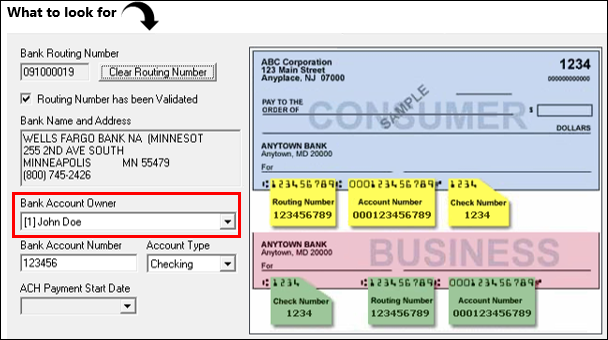
A Bank Account Owner drop-list has been added to the Recurring ACH Payment screen to select which borrower is the owner of the selected bank account (see example below). This is an important field for applications where more than one borrower or signer is listed on the loan. This allows the user to select which borrower's ACH account is being used for recurring payments.
The boarding process has also been modified to use the selected borrower for creating the External Payment Account (FPEA) record on the host. This record accompanies the borrower when creating ACH payments from the EZPay screen (see the E-checks topic in the EZPay manual for more information).
The following GTPC fields will need to be added to your loan programs for this enhancement to work correctly:
|
CMP: 10965
The following fixes are included in this version of GOLDTrak PC:
1.Improved error handling for responses from the Member New Enrollment call from FIMC, a third-party company that offers home and auto benefit plans. 2.GTPC will now ensure that the employment list is always up-to-date on the Employment tab of the CIF Compare screen when users click <Reload Host Data>. 3.Resolved a potential crash when closing without saving if the application was newly created and multiple applications are open. 4.A minor update to the Credit Report dialog to eradicate a potential bogus error message. 5.An update to fix certain pop-up screens to cause the Field Options dialog box (press <F2> on your keyboard to view) to launch properly when the active control is a drop-list. 6.An update to TILA to ensure data saves properly when a list item changes. 7.DDS support removed from GTPC Setup. 8.&UNDERWRITEATTAIN support removed from formulas.
CMP: 11657
9.Resolved an error that occurred when applying a Payment Calculator plan that included commission values.
CMP: 11714
10.Resolved a ReadRange Error in BackTracking. |
CMP: 11452
Changes to GTCOM will likely not be noticed by your institution. However, we document these changes here for your information. GTCOM is a backend service that manages communication between GOLDTrak PC and external applications and services.
GTCOM had minor irregularities between 7.9 and other versions that were brought back into sync with this CMP. Affected portions of GTCOM include:
1.GetCookie: Fixed parameters in call to GetIrregularSeqCookie (last updated: 9/26/08). 2.GetIrregularSeqCookie: Will now always return the record sequence if requested to do so. 3.SetData/SetDataString: A parameter is now provided to determine whether the field changed.
|
CMP: 11374
Bug fix: GTPC will no longer hang or crash when attempting to close the loan request after updating the Rent/Own field on the Consumer Application screen. Note: This would happen only if attempting to close the application when the Rent/Own drop-list still had focus. |
CMP: 7854
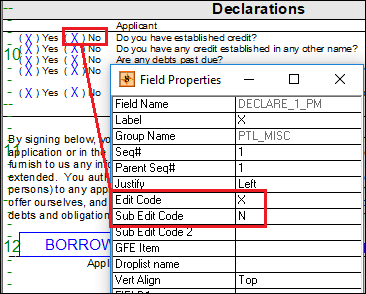
During design of GOLDTrak documents (GTPC Setup > Design Setup > Documents), an Edit Code of X is used to print an "X" in fields only if the field data in the application matches the value that is stored in the Sub Edit Code. These are set up in the properties of fields mapped to a document by right-clicking on the field on the Documents screen and editing the Field Properties dialog box. The following is an example of an Edit Code X and where it would print on a document:
How it currently works:
A Sub Edit Code of N (no quotes) is used to mean "false”. This means that an X will print if the field in question is blank (or N in case of Y/N fields). In other words, if the user does not enter anything into that field on the application, when the document prints, it prints an X in that field.
We have found that when mapping some fields in documents that use this X code, a field can contain a value of N that would be considered a positive indicator that an X should be printed on the document. Therefore, we have enhanced this field to add flexibility when X is printed.
What we’ve added:
If the Sub Edit Code entry is surrounded by quotes, the X will only get marked in the document if the field value in the application and the Sub Edit Code match exactly, regardless of what the value is.
This enhancement was needed to address the aforementioned scenario: Sub Edit Code = N (no quotes) and the loan field value on the application was blank.
Be aware that in most cases, adding quotes to the Sub Edit Code will not change its behavior, but there are two scenarios where it does:
1.If the Sub Edit Code is N (no quotes) or 0 (no quotes), there are some logical gymnastics that take place since N and 0 were assumed to also mean No or false. So if the Sub Edit Code is either N or 0, and if the field value is either N or 0 or is empty, the X will appear. Adding quotes will resolve these possible ambiguities.
2.The other scenario where the quotes are important is for differences in case.
Additionally, be aware that multiple values can be entered for the Sub Edit Code separated by commas, and an X will appear if any of those values matches the field value.
Examples:
Sub Edit Code = "N" (quotes included) Field entry on the application is empty What prints in the document for that field? Nothing (blank).
Sub Edit Code = "N" (quotes included) Boolean field entry on the application is set to false (N). What prints in the document for that field? X
Sub Edit Code = " ","" (This indicates that if the user does not enter anything or enters a space in the field, then the document will print X in that field.) Field entry on the application is a single space. What prints on the document for that field: X
Sub Edit Code = " ", "" Field entry on the application is empty. What prints on the document for that field: X
Sub Edit Code = "Employer",""," " For that field on the application, the user enters either Employer, leaves the field blank, or enters a space. What prints on the document for that field: X
Sub Edit Code = "Employer" For that field on the application, the user enters EMPLOYER (all caps). What prints on the document for that field: Nothing (blank)
Sub Edit Code = Employer For that field on the application, the user enters EMPLOYER (all caps). What prints on the document for that field: X
As a reminder, functionality for when Sub Edit Code is N or 0 remains as-is. This ensures that any documents that you currently have mapped remain unaffected by this enhancement until you choose to change them. |
CMP: 11423
One institution reported that the File Services Plus loading dialog would remain open and never close after logging in to GOLDTrak PC. The institution was still able to work within the application, but the File Services dialog would also remain open. This has been resolved, and the File Services Plus application is now closed after logging on.
File Services Plus is a document and file storage application. If your institution doesn't use File Services Plus currently and would like to learn more about it, see the File Services Plus User's Guide in DocsOnWeb. |
CMP: 11060
The following enhancements have been applied to the Black Book screen. The Black Book screen connects to Black Book's collateral database, which provides up-to-date valuation estimates for vehicles.
1.If any Equipment Options were selected, the vehicle's total value was being incorrectly recalculated each time the user clicked on the vehicle in the list. This has been fixed to correctly calculate the total, and then keep it the same when the user clicks on the vehicle in the list.
2.The Tot Val column has been changed to Avg Val.
3.A new column has been added to display the clean value: Cln Val.
4.Cars with equipment options that say "Included" were having calculation issues causing the total to be incorrect. These errors would not show up initially but would appear in subsequent visits to the screen.
5.The data in the vehicle list will now be updated more frequently and should always match what is stored in the GTPC data fields (although not necessarily saved to disk).
6.Some of the "GTBlackBook" traces have been enhanced to show the vehicle's year, make, and model to make it easier to make sense of the traces.
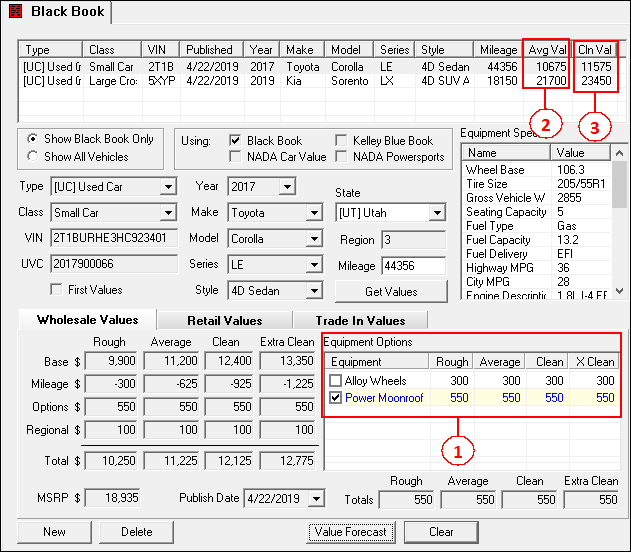 Black Book Screen |
CMP: 11570
A fix has been put in place to prevent GOLDTrak PC from closing if a vehicle with a valuation from another provider (NADA, KBB, etc.) were to be selected in the Black Book screen. (This would only happen after the Show All Vehicles radio button was selected.) |
CMP: 11216 Work order: 55561
Updates have been made to ensure that the correct filter settings are written to your computer's Registry before reloading the Current Loans screen. Previously, the screen was depending on triggers to update these settings and those triggers could potentially be avoided, preventing the correct filters from being used when reloading the screen.
•Registry settings (from filter data) now being updated in HKEY_CURRENT_USER/SOFTWARE/DHI Computing Service/GOLDTrakPC each time the Current Loans screen is reloaded •The Select by drop-list selection is stored in "SelectByFieldName" •The Selection Data edit control data is stored in "SelectByData" •The Application Date Range radio button selection is stored in "UseDateRange" •The Changed in last edit control data is stored in "DaysBack" •The From date control data is stored in "DateLow" •The to date control data is stored in "DateHigh" •The Display Loan Status drop-list selection is stored in "LoanStatus" •The Current Phase drop-list selection is stored in "SelectCurrentPhase"
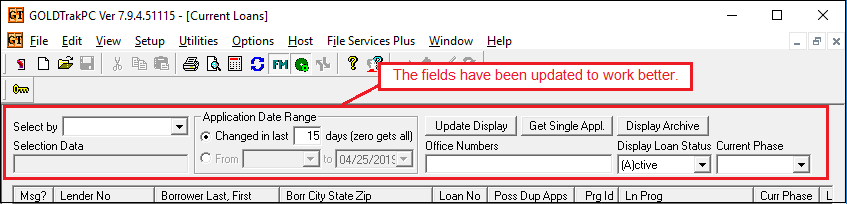 Click to expand. (Note that CMP 11606, which is related to this one, has not yet been completed. That error manifests when the "Refresh” button is pressed again after the previous load had been aborted using the “Discontinue” button. When this happens, the loan data that comes in is a continuation from the previous refresh, using the old filter settings, rather than a new refresh using the current filter settings. We will notify you through this release when this CMP has been completed.)
|
CMP: 11249
We have restored some functionality to the Income screen that existed in GOLDTrak PC prior to version 7.9. The default label of Payday Income has been restored to be a more accurate description ("Monthly Income," "Weekly Income," etc.) based on the value entered in the Payday Frequency field (PAY_FREQ_I) when it is updated. The label "Payday Income" is only displayed if the Payday Frequency (PAY_FREQ_I) has not yet been selected, as shown below:
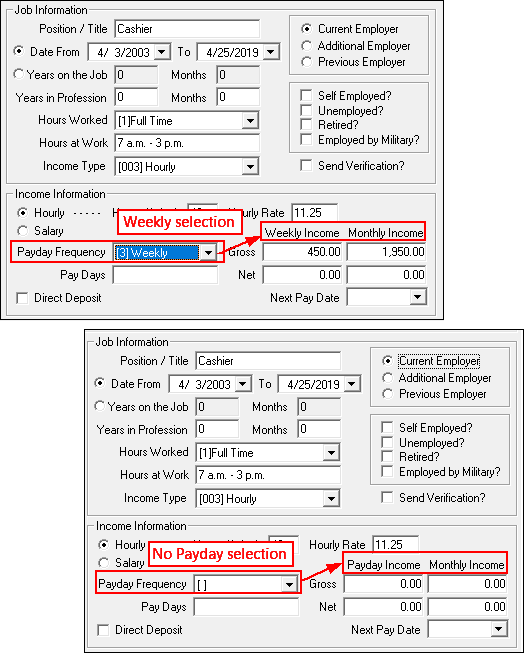 Consumer Application > Borrrower/Co-borrower Income |
CMPs: 11168, 11175
The following changes have been made to formula functions. These changes are more for GOLDPoint Systems account managers, but we list them here for your information.
•We have updated a rare scenario that would cause GOLDTrak PC to crash if the &HIDESCREEN formula function was attempted to be used on the active screen.
•GTPC will keep track of all &SHOWSCREEN and &HIDESCREEN formula function requests that are made during an entire batch of formulas. Now later requests may possibly override previous requests. If both &HIDESCREEN and &SHOWSCREEN are used for the same screen, the last one wins. GTPC will not carry out any &SHOWSCREEN and &HIDESCREEN actions during formula processing.
•All &SHOWSCREEN and &HIDESCREEN requests will be performed after all formulas have finished processing.
•Support has been added to allow a quasi-field (a field name that is constructed inside a LOOP) to be successfully used as the field parameter in the STOP function. |
CMP: 11092
The Credit Report dialog no longer restricts users from selecting both the borrower and co-borrower for a FactorTrust credit report. When both borrowers are selected with FactorTrust, a red warning now appears: "Two individual reports will be pulled rather than a joint report."
When FactorTrust credit is pulled with both borrowers selected, two separate reports are now pulled. See the example below.
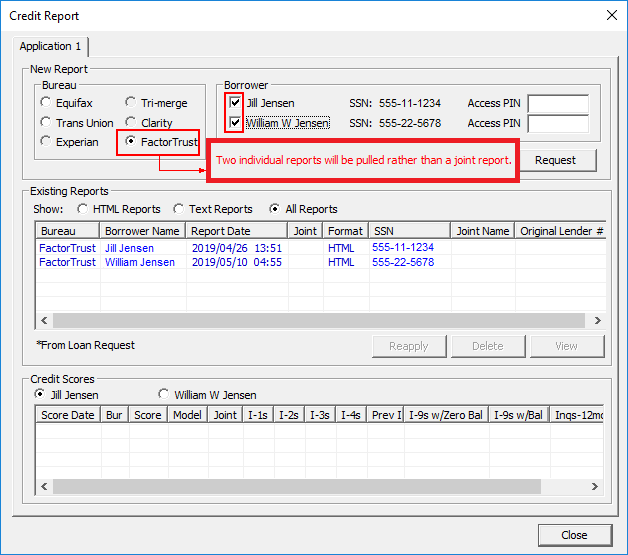 Click to expand.
|
CMP: 11298
The following changes have been made:
1.Whenever Loan Request History is saved, the HISTORY_MAIN record will now be updated to reflect the last changed date/time and the last changed user name. This will correct a problem in the View Loan Request History screen in GOLDTrakPC Setup (GTPC Setup > Utilities > View Loan Request History). Previously, the Search button would not find all history items within the specified date range; going forward, it will correctly find the items in the specified date range. However, please note that date range searching will only be fixed for loan requests that have had history updates using the new version of GOLDTrakPC; older history items will still manifest the date range search problem.
2.In the View Loan Request History screen in GOLDTrakPC Setup, the following updates have been made:
a.New search option, "Last Changed By," was added to the Select by drop-list. (Please be aware that the search results based on this option may not be accurate for older history items that have not been updated since the new version of GOLDTrakPC has been released.) b.New column, Last Changed By, was added to the search results list control. c.When a date range is selected in Last Changed When, it will now handle dates that were entered in reverse order and it will set the times to include the entire day.
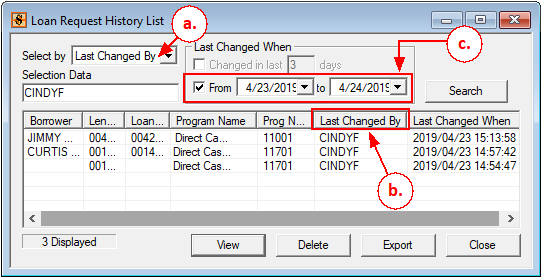 Loan Request History List (GTPC Setup > Utilities > View Loan Request History) |
CMP: 11502 Work Order: 55704
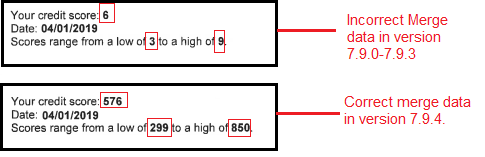
We have corrected a merge field error in GOLDTrak PC when using some credit score fields. Miscommunication with host fields and GTPC fields was causing certain fields to round credit scores when including them in event letters printed from GOLDTrak PC.
For example, if the merge field <<CBR_SCORE1_PM>> was 759, the event letter record data (Host field) was only displaying one digit and rounding that digit. So “759” became “8” when the fields were merged with data in the event letter.
This was only occurring in GTPC versions 7.9 and above. Previous versions worked fine. If you use any of the following merge fields, be sure to use the latest version of GOLDTrak PC (7.9.4), and check the fields on your documents to see if they are merging data correctly with this version.
<<CBR_SCORE1_PM>> <<CBR_MDL_MIN_RANGE_PM>> <<CBR_MRL_MAX_RANGE_PM>> <<CBR_PERCENTILE_PM>>
GTPC will now ensure that when the G0 record (GOLDTrak Event) on the host is populated with integer values from GTPC, they are stored as decimal values properly for the following fields:
•G0TT01 (Work Total 1) •G0TT02 (Work Total 2) •G0TT03 (Work Total 3) •G0TT04 (Work Total 4) •G0TT05 (Work Total 5)
 |
CMP: 9472
A new transfer field, Unearned Int No 510 Tran (TF_LN78OI_INT), is now available to be added to loan programs in GOLDTrak PC for precomputed loans.
This transfer field populates the Original Unearned Interest field (mnemonic LN78OI) on various CIM GOLD screens (Loans > Account Information > Precomputed Loans, Loans > Original Loan Disclosure, Loans > Purchase Disclosure, and Loans > Statistics and Summaries > Summary). This transfer field is not dependent on the interest increase transaction (tran code 510).
This field is found in the TRANSFER_FIELDS group. The information in this field will only transfer to CIM GOLD if it has a positive value.
|
CMP: 9658
We are working on some extensive programming to speed up boarding for applications created in GOLDTrak PC. This new way of boarding is called “Native Boarding” and it uses GOLDPoint System’s Sierra Boarding Service to board loans.
We are not yet ready to launch Native Boarding, as it is still undergoing some testing. However, with this release, we have added some functionality in the backend of GTPC that should not affect the current processing. Once Native Boarding is ready, we will notify you through this What’s New document. |