ECOA Code Can Now be Hidden |
  

|
Navigation: GOLDTrak PC What's New > GOLDTrak Version 7.9.7 - 7.9.10 >
ECOA Code Can Now be Hidden |
|
CMP: 3377
The ECOA Code field on the Borrower Additional Information screen can now be hidden. The Borrower Additional Information screen is found from the Consumer Application screen by clicking <Additional Info>. Contact your GOLDTrak account manager if you would like to have this hidden for your institution.
 |
GOLDPoint Systems Only:
A new field in the LOAN_REQ_MISC7 record must be set to "Y" in order for the ECOA code to be hidden. The new field is Hide ECOA Field (HIDE_ECOA_M7). Add that field to any formulas needed on that screen. |
|---|
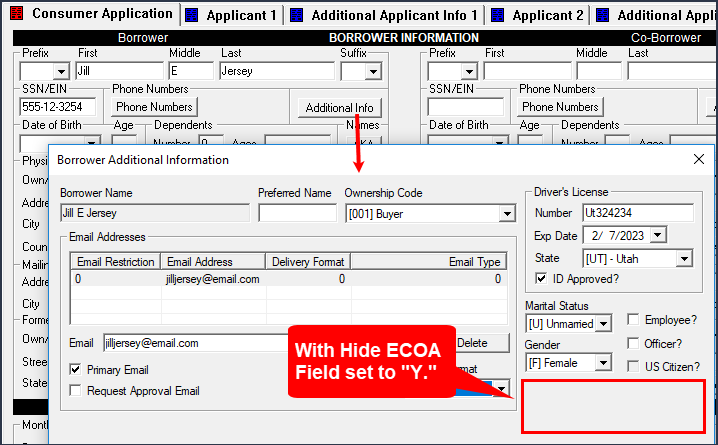
Borrower Additional Information dialog box with Hide ECOA Field set to "Y"
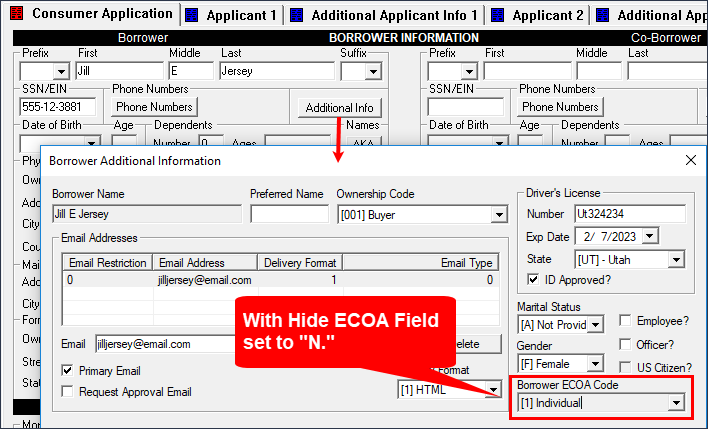
Borrower Additional Information dialog box with Hide ECOA Field set to "N"