GOLDTrak Version 7.8.26 - 7.8.27 |
  

|
Navigation: GOLDTrak PC What's New >
GOLDTrak Version 7.8.26 - 7.8.27 |
|
The following enhancements have been made to GOLDTrak PC versions 7.8.26 through 7.8.27:
CMP: 10215 Work order: 53100
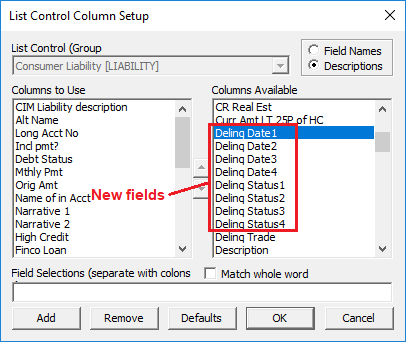
We have added the following fields to the LIABILITY group:
This delinquency information was already being stored in the TRADE_LINE group in the DELINQ_DATES_TL field, but for convenience, it is now being broken out into more accessible components in the LIABILITIES group.
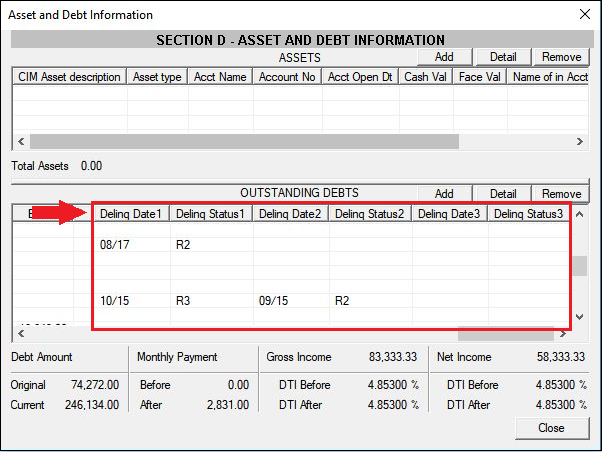
These fields show up to four delinquency dates and status information when pulling credit report information. If you would like any of these fields to show on the Liabilities list-view table, complete the following steps:
1.On the Asset/Debt Info screen, right-click the Outstanding Debts table and select "Setup List Columns."
2.A message will appear asking if you want to save changes for all users or just temporary changes. Click <Yes> for all users or <No> for just temporary changes.
3.In the List Control Column Setup, select any or all of the new fields, then click <Add> (as shown below).
Those columns are now added to the Liabilities list view.
When you load credit information, those columns will show delinquency statuses and the date those accounts became delinquent.
|
CMP: 6856
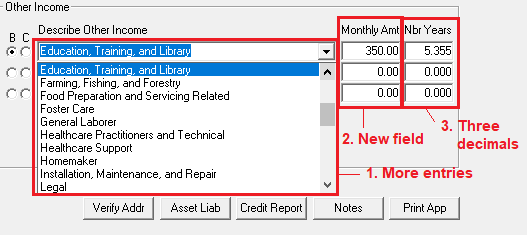
Fields have been added to the Consumer Application screen in GOLDTrak PC. In the Other Income field group, we added the following:
1.Added additional other incomes to the Describe Other Income drop-list. 2.Added the Monthly Amt field to designate how much the borrower or co-borrower makes in additional monthly income. 3.Increased the Nbr Years decimal to be three instead of two.
See changes below:
|
CMP: 6885 Work order: 50631
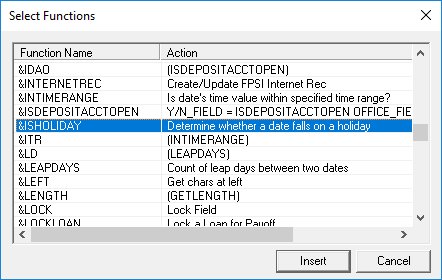
We have added a new formula function, &ISHOLIDAY, which can be used in formulas.
This formula function takes into account Sundays and holidays. This formula was requested by one institution for the Notice of Cancellation to populate the maximum notice date by adding three business days but excluding Sundays or federal holidays to the Contract Date.
Your GOLDPoint Systems account manager can add this function to any formula using GOLDTrak PC Setup. The following is an example of how this formula can be used (the formula is highlighted in yellow below):
DATE.DTE = &MAKEFIRSTOFMONTH DATE.DTE COUNTER.NBR = 1 LOOP 28 TEMP.TXT = "February " TEMP.TXT += COUNTER.NBR TEMP.TXT += " is a " ISHOLIDAY.Y/N = &ISHOLIDAY DATE.DTE IF ISHOLIDAY.Y/N = Y TEMP.TXT += "Holiday" ELSE DAYOFWEEK.NBR = &GETDAYOFWEEK DATE.DTE IF DAYOFWEEK.NBR = 1 TEMP.TXT += "Sunday" ELSE IF DAYOFWEEK.NBR = 7 TEMP.TXT += "Saturday" ELSE TEMP.TXT += "Work day" END END END MISC_LNRM_01(COUNTER.NBR) = TEMP.TXT DATE.DTE = &ADDDAYS 1 DATE.DTE COUNTER.NBR += 1 LOOP_END |
CMP: 8858
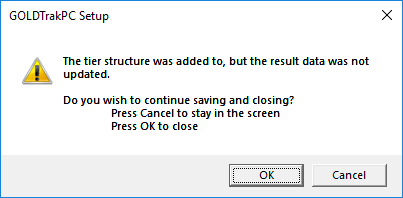
A Cancel button has been added to a message that would appear sometimes when adjusting tiers on the Tier Table Setup screen in GOLDTrak PC Setup and clicking the <OK> button. This warning message would say,
But the message did not have a Cancel button. This has been corrected, and now if that message appears, a Cancel button will be there, as shown above. |
CMP: 7967, 10379, 10560, 10688 Work Order: 51372
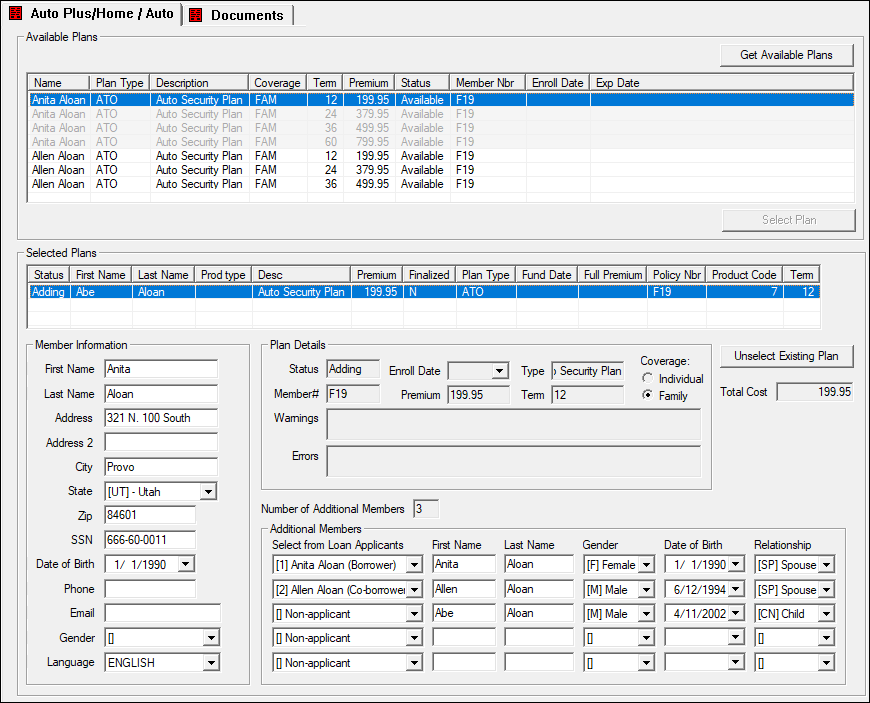
We have created a new red screen for third-party ancillary product integration called Auto Plus/Home/Auto. Currently, this screen only integrates with FIMC to bring up and offer their plans. Future development may include other companies. Contact your GOLDPoint Systems account manager if you are interested in implementing this screen with other ancillary companies or FIMC.
To implement this new screen, additional fields were added to the ANCILLARY_PRODUCT record. Some highlights of this screen include:
•Any member of the family, even if they are not on the loan, can be added to this screen for Family plans. •Plans that are offered are dependent on the office number for the loan. Office numbers help locate where the loan is being created, and therefore, different plans may be offered in different states/locations. •Once the loan is funded and boarded, the ancillary product will show in CIM GOLD under Loans > Optional Products > Ancillary Products. •All documents will be included with loan finalization.
In order to use this screen, backend programming connecting to FIMC's API's must be completed. You will need to contact your GOLDPoint Systems account manager if you are interested in adding this screen to any of your loan programs. The following is an example of this screen in GOLDTrak PC:
 Click to enlarge. |
CMP: 9031, 9107
We have corrected an issue where credit pulls were failing the first time users attempted to pull credit from Equifax. On subsequent pulls, it worked okay. The credit will now pull correctly when users pull credit for Equifax the first time. |
CMP: 9009
Two people cannot be in the same application at the same time and both making changes. The first person in the application can make changes, and the second person will be able to view the application but not make changes (all fields will be grayed out). After version 7.8.28 of GOLDTrak was released, a user found that two people could be on the same application at the same time and both make changes. This has been corrected, and the lock is back in place. |
CMP: 8656
We have updated the Consumer Application screen to no longer require a double-click on the Phone Number button and Copy to Mail button in order for the pop-up screens to show. We discovered that this only happened if data was being entered in a control (field or drop-list) and the user didn't navigate to another field before clicking those buttons. Regardless of whether the user navigates away from a field after entering data or not, those buttons will now work correctly on a single click. |
CMP: 7637 Work Order: 51391
If your institution has multiple organizations, we can now brand texts and email message sent from SolutionsByText using the specific organization for the applicant. For example, if your institution allows loans for two companies (Company A on the West Coast and Company B on the East Coast), and all applicants from offices 1000 to 2000 should receive emails indicating they're from Company A, we can now allow for that.
Significant setup is required by GOLDPoint System's programmers in order to use the different brands. The setup is done automatically for you when loan applications are processed. The brand the application comes from is shown when the phone number is added on the Consumer Application screen (then click <Phone Numbers>), as shown below:
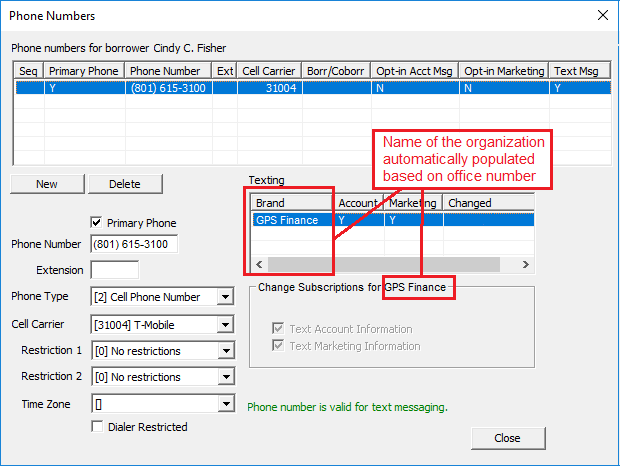
This information will be boarding over to CIM GOLD on the Households screen once the loan has been funded.
See CMPs 7266, 7638, 8636 in the Update document for other important information regarding updates to CIM GOLD as well. |
CMP: 8930
An institution needed additional data with their LexisNexis integration for loan applications in eGT. Therefore, we updated the &GETLONGTERMPIN formula function to send these additional XML tags to LexisNexis:
FirstName, SSN, PhoneNumber, Address, City, ZipCode, and Country.
This is for the LexisNexis API integration. LexisNexis provides a way to securely verify that the applicant is who they say they are before eSignature is allowed. A screen or pop-up fields usually appear during the loan application process in eGT, where the applicant can verify certain information about themselves, such as a last known address, a previous loan on a car, or maiden name. That information is pulled from LexisNexis APIs.
Note 1: Last4SSN was being sent previously (and will continue to be sent) but now they need the full SSN, which will be sent as a 9-character string of numbers.
Note 2: The Country item comes from RESI_COUNTRY. "US" will be sent if RESI_COUNTRY is blank.
|
The GTPC - Delta Saves project is a change to the way we save GOLDTrak PC applications. Before these changes, we were saving all data for an application both to the host and the server database each time we did a save. With the Delta Saves Project, we only save the records that were changed. This “delta” save process has been implemented both on the “Save to the host” and the “Save to the server database." This will provide significant time savings when saving applications, as well as speed up updating applications and the boarding process. There is an institution option, NDLT, that needs to be turned on and is available in beta to test this functionality. |