GOLDTrak Version 7.8.17 - 7.8.25 |
  

|
Navigation: GOLDTrak PC What's New >
GOLDTrak Version 7.8.17 - 7.8.25 |
|
The following enhancements have been made to GOLDTrak PC versions 7.8.17 through 7.8.25:
Corrections were made to the total payments calculation, when doing validation, to account for odd first and last payments. Previously, GOLDTrak PC was assuming all payments were the normal payment amount, so the total payment calculation was incorrect in cases where the first or last payment was not that amount. |
•CALCSALES GTPC formula function changes: oCorrection to the calculation of the Amount to Dealer (subtract the total payoff amount). oAbility to process a FINANCING_TYPE1 value of 8 the same as types 2, 5, and 6 when calculating the Total Net Balance.
•Contract Booking screen: oAdded controls for First Payment, Last Payment, and Next Payment Date, and show/hide them based on new fields and display features. oFirst Payment, Next Payment, and Last Payment are now only editable if doing validation. oChanges to the display of term and number of payments for clarification: ▪was: "Term/Nbr Pmts ____ ____" ▪now: "Term nn, Nbr Payments ____" (nn = Term in Months) oDecimal number fields were fixed so that when pasting a value (Ctrl + V), the value will be saved in the field and formulas will run.
•NADA Vehicle Values screen oMileage no longer gets cleared when the state changes. oFormulas will run for key state/region NADA fields after selecting “New." oNADA screen will now accept data with case mismatch in region, make, model or trim (e.g., COUPE 2D instead of Coupe 2D)
•Dealer Send Change: If successful, won't show message asking whether to view a message. |
New GTPC vehicle, commercial vehicle, RV, and powersports valuation interface. Database information must be present in order to use this new service. Please contact your GOLDPoint Systems account manager for details. |
For institutions with contracts with Solutions by Text, a third party offering "compliance guaranteed" texting solutions, we can set up GOLDTrak PC to communicate with SolutionsByText interface. An institution option, as well as CIM GOLD version upgrade is required with these changes. |
This version contains a functional interface to FactorTrust as an alternative credit bureau. Some set up is required. A bug was found in 7.8.21 that closed GTPC if a blank was returned from a credit bureau. This has been resolved in 7.8.22. Setup of credit bureau data is necessary in GTPC Setup. Contract with FactorTrust is required for setup. |
This version contains a functional interface with Creative Business Decisions, a third-party decisioning company. Contract with CBD is necessary for setup. A new screen listing decisioning response and rationale is available in any selected loan program once setup is completed. |
Consumer Payments view screen now recalculates points or percentage any time a change is made to insurance. The following error message will now be displayed if the points exceed 4 and the override is checked: "Points may not exceed 4. Please adjust loan amounts accordingly." Check occurs prior to boarding and a stopper is in place. |
When calculating the dealer participation amount (DLR_PARTICIPATE_AMT) and the amount is to be based on a percentage (PARTIC_TYPE_DLR_LRD is P), the code will now calculate the percentage based on the field identified in PART_CALC_FIELD_LRD, rather than always basing it on AMOUNT_FINANCED. (If PART_CALC_FIELD_LRD is blank, it will use AMOUNT_FINANCED.) The valid field names are: AMOUNT_FINANCED, LOAN_AMOUNT, PURCHASE_PRICE and CASH_TO_CUSTOMER. If a different field name is entered in PART_CALC_FIELD_LRD, an error will be issued. Note: Some formula adjustment may need to occur. |
GTPC now has the ability to track changes within an application. In order for event tracking to occur, the loan program must have field USE_APP_TRACK_TRIGGR set to true in GOLDTrakPC Setup. Once that is set, the fields for each individual event must also be set to "true" in order for that event to be tracked.
•To set USE_APP_TRACK_TRIGGR, check the Tracking Triggers? checkbox in the Loan Program Editing screen in GOLDTrak PC Setup. •To set the fields for the individual events, click on the "Tracking Triggers" tab and check the check boxes that should be tracked.
Please note that formulas are primarily responsible for tracking the events. The program will set the APP_EVENT_TRACK_CODE field to a value indicating the event that just occurred, and then formulas will run. A formula will need to check that field against the codes it is interested in and create tracking records as needed. Two new groups have been added for recording the tracking data: APP_EVENT_HEADER and APP_EVENT_ITEM. (Formulas are able to manage these groups; they are not able to manage the old group, APP_EVENT_TRACKING, because of the way the key is set up.) If the Save Any event is turned on but the 1st Save or Auto Save is not, the event will come through as Save Any.
New Groups/Fields in LOAN_PROGRAM_MAIN
We have added new groups/fields in LOAN_PROGRAM_MAIN to accommodate tracking changes:
New Groups/Fields in LOAN_REQ_MISC8
We added the following fields/groups in LOAN_REQ_MISC8 to accommodate tracking changes:
New Groups
We added the following new groups to accommodate tracking changes:
•APP_EVENT_HEADER: new group (subgroup of LOAN_REQ_HEADER) •APP_EVENT_ITEM: new group (subgroup of APP_EVENT_HEADER)
Screen Changes in GOLDTrakPC Setup
We have made the following screen changes in GOLDTrakPC Setup to accommodate tracking changes in applications:
•Added a new checkbox, Tracking Triggers?, to the Loan Program Design > Information tab. When that box is checked, the Tracking Triggers tab is displayed, as shown below. (The Loan Program Design screen is accessed from File > Open Loan Program, then open a current loan program by double-clicking it from the list.)
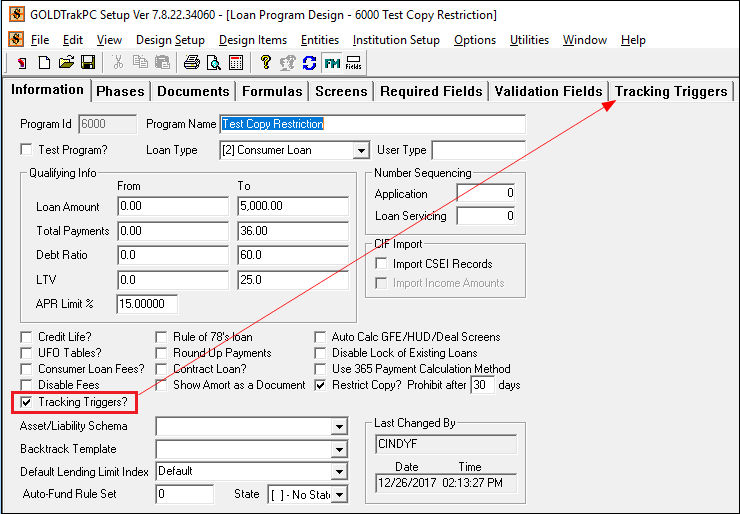 File > Open Loan Program > Loan Program Information Tab in GOLDTrak PC Setup
Open the Tracking Triggers tab and check the boxes next to each event your institution wants a notification to generate, as shown below:
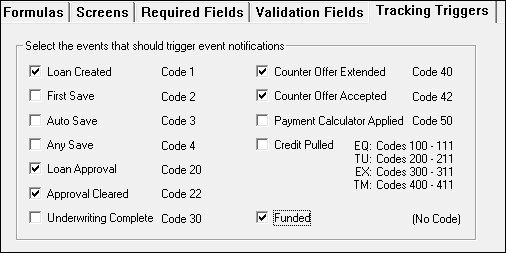
Codes that are set in APP_EVENT_TRACK_CODE for the various events:
•If the Funding event is selected for tracking, the tracking will happen automatically rather than by formulas. APP_EVENT_HEADER and APP_EVENT_ITEM records will automatically be created as event type 65000 "Fund." •The APP_EVENT_TRACK_CODE field will be automatically cleared at the end of formula processing. •The credit pulling events will be sent individually for each borrower whose credit was pulled, even for joint reports. •An enhancement was made to formulas to allow for multiple or intermixed sequence types. Multiple fields can now be used as sequence values for fields. Example: USER_NAME_AEI(ISEQ.NBR,HSEQ.NBR) = LOCKED_BY_LRM |
Special characters are now accepted in the title of documents. Previously, special characters were causing an error when users went to sign documents. Special characters are now converted to valid HTML values before sending to Signature Portal. |
We have added the ability to use the scroll on your mouse for screens that have extra fields and the screen is not resized to view all those fields. Now a drag bar appears on the right, and you can use your mouse wheel to scroll to view additional information. This is for all screens, dialogs, and tabs in GTPC and GTPC Setup. |
GTPC existing Loan fields that are now available to pull back in from loan servicing fields:
|
During the funding of a loan with a loan to payoff, the loan to payoff is updating the field Renewal Date 1 (MLRNW1) from the field TF_OPEN_DATE. This process was changed to put today’s date in MLRNW1 if TF_OPEN_DATE does not fill it properly. |
The URL for the Doc_Service DBASE_INFO item now pulls from the office the user is currently logged into first, and if it is empty, then the code looks at office 0. This is to make it so the EMAIL and Save PDF buttons will appear on the Documents screen when you just have the Doc_Service item setup in office 0. |
Added code to dynamically add or remove tabs according to the check boxes selected without having to close and save, and then reopen, the program. This will update using the "Apply" button. |
The GTPC - Delta Saves project is a change to the way we save GOLDTrak PC applications. Before these changes, we were saving all data for an application both to the host and the server database each time we did a save. With the Delta Saves Project, we only save the records that were changed. This “delta” save process has been implemented both on the “Save to the host” and the “Save to the server database." This will provide significant time savings when saving applications, as well as speed up updating applications and the boarding process. There is an institution option, NDLT, that needs to be turned on and is available in beta to test this functionality. |

