New Fields for Delinquency Status/Date in Credit Report |
  

|
Navigation: GOLDTrak PC What's New > GOLDTrak Version 7.8.28 - 7.8.39 >
New Fields for Delinquency Status/Date in Credit Report |
|
CMP: 10215
Work order: 53100
We have added the following fields to the LIABILITY group:
Field Name |
Type |
Length |
Label |
Description |
|---|---|---|---|---|
DEL_DATE1_LB |
Text |
0005 |
DelinqDate1 |
Delinquency Date 1 |
DEL_DATE2_LB |
Text |
0005 |
DelinqDate2 |
Delinquency Date 2 |
DEL_DATE3_LB |
Text |
0005 |
DelinqDate3 |
Delinquency Date 3 |
DEL_DATE4_LB |
Text |
0005 |
DelinqDate4 |
Delinquency Date 4 |
DEL_STATUS1_LB |
Text |
0002 |
DelinqStatus1 |
Delinquency Status 1 |
DEL_STATUS2_LB |
Text |
0002 |
DelinqStatus2 |
Delinquency Status 2 |
DEL_STATUS3_LB |
Text |
0002 |
DelinqStatus3 |
Delinquency Status 3 |
DEL_STATUS4_LB |
Text |
0002 |
DelinqStatus4 |
Delinquency Status 4 |
This delinquency information was already being stored in the TRADE_LINE group in the DELINQ_DATES_TL field, but for convenience, it is now being broken out into more accessible components in the LIABILITIES group.
These fields show up to four delinquency dates and status information when pulling credit report information. If you would like any of these fields to show on the Liabilities list-view table, complete the following steps:
1.On the Asset/Debt Info screen, right-click the Outstanding Debts table and select "Setup List Columns."
2.A message will appear asking if you want to save changes for all users or just temporary changes. Click <Yes> for all users or <No> for just temporary changes.
3.In the List Control Column Setup, select any or all of the new fields, then click <Add> (as shown below).
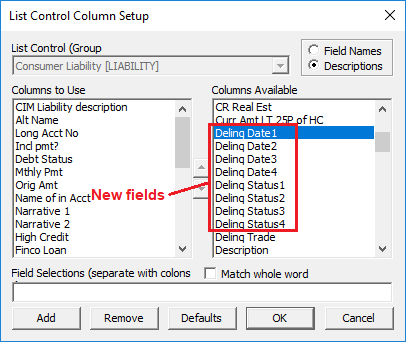
Those columns are now added to the Liabilities list view.
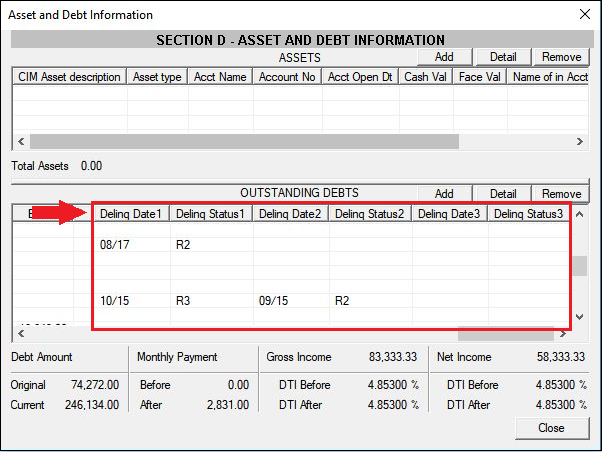
When you load credit information, those columns will show delinquency statuses and the date those accounts became delinquent.
Note: Delinquency status codes are brought over from the credit report. They are defined as follows:
|
|---|
 |
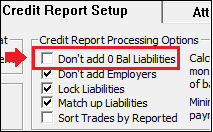
Remember: An institution option is available that will not show trade lines (accounts) with zero balances when pulling liabilities from credit reports. This option, Don't Add 0 Bal Liabilities, is found in GOLDTrak PC Setup > Institution Setup > Credit Report Setup tab, as shown below:
|
|---|