New Kelley Blue Book/Black Book Pop-up Screen |
  

|
Navigation: GOLDTrak PC What's New > GOLDTrak Version 7.8.28 - 7.8.39 >
New Kelley Blue Book/Black Book Pop-up Screen |
|
CMP: 10762
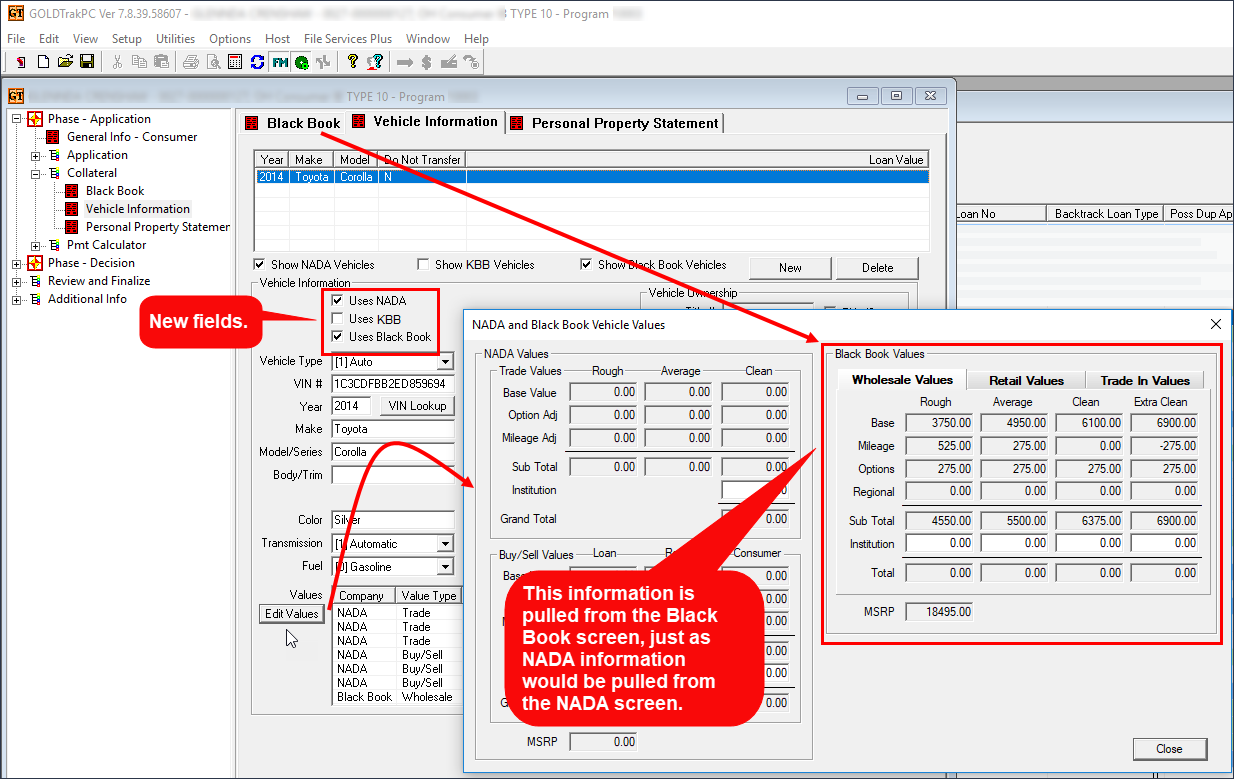
The Vehicle Information screen has been enhanced to show NADA, Kelley Blue Book, and Black Book information for vehicles, depending on whether you use NADA, Kelley Blue Book, or Black Book. To aid in this effort, three new checkbox fields, Uses NADA, Uses KBB, and Uses Black Book, show near the top of the Vehicle Information screen.
•If the Uses NADA box is checked, clicking <Edit Values> will show the NADA information tied to the collateral.
•If the Uses KBB is checked, clicking <Edit Values> will show the Kelley Blue Book information tied to the collateral.
•If the Uses Black Book box is checked, clicking <Edit Values> will show the Black Book information tied to the collateral.
•If all are checked, the values from all entities will show.
See the following example of these fields and changes on the Vehicle Information screen in GOLDTrak PC:
Click to expand.