New Options to Hide Decision Buttons |
  

|
Navigation: GOLDTrak PC What's New > GOLDTrak Version 7.9.17 - 7.9.25 >
New Options to Hide Decision Buttons |
|
CMP: 15738
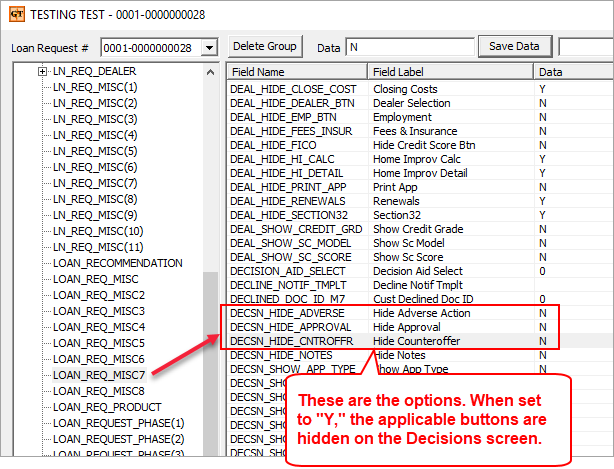
New fields have been added to the LOAN_REQ_MISC7 group: DECSN_HIDE_APPROVAL, DECSN_HIDE_CNTROFFR, and DECSN_HIDE_ADVERSE. These new fields can be used respectively to hide the <Approval>, <Counteroffer>, and/or <Adverse Action> buttons on the Decision screen (see below).
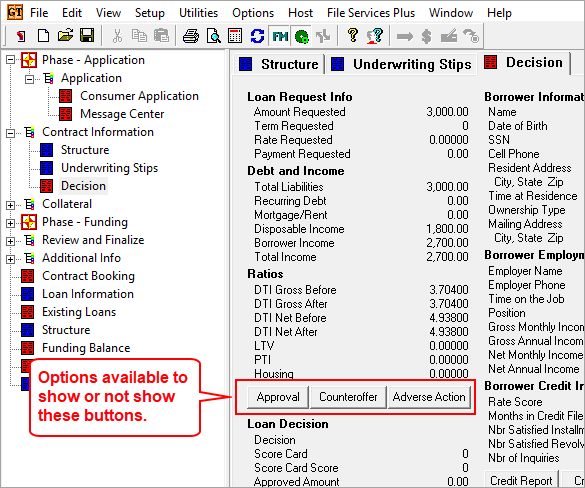
Your GOLDPoint Systems account manager can add these fields to formulas in your loan program, so the buttons are automatically shown or hidden.
However, if you want to manually hide these buttons for individual applications, complete the following steps:
1.Right-click the application on the Current Loans screen and select “View Loan Data.”
2.Select the LOAN_REQ_MISC7 record in the left column of the dialog and find the field names in the right column (see below).
3.Enter "Y" to hide the buttons, or "N" to allow them to be visible (this entry is case sensitive: must use capitalization). Any button corresponding to one of these fields marked with a "Y" will not be visible on the Decision screen.